Document vault
Your firm’s knowledge, locked down tight.
Every document encrypted, isolated in your firm’s own database schema, and instantly searchable by AI. Attorney-client privilege isn’t an afterthought. It’s the architecture.
Lite $15/mo · Pro $149/mo · Cancel anytime
How it works
Upload to insight in four steps.
Upload
Drag & drop files or bulk import entire folders.
Auto-tag
AI categorizes by jurisdiction, type & practice area.
Encrypt & isolate
AES-256 encryption in your firm’s private database.
Search & use
Semantic AI search finds what you need instantly.
Capabilities
More than storage.
Every feature designed for how lawyers actually manage documents.
Organize your way
Documents map to the project and folder they belong to, so your vault mirrors how your firm already thinks: by project, by client, by practice area.
- Documents organized by project and folder
- Folder structure preserved when you import
- Mirror your existing project and client layout
Find anything in seconds
Semantic AI search understands what you mean, not just what you type. Ask ‘landlord tenant security deposit Utah’ and find every relevant document, even if those exact words don’t appear.
- Semantic search across all documents
- Filter by project, date, type, or tag
- Results ranked by relevance
Share securely, on your terms
Generate password-protected share links for clients and co-counsel. Set expiration dates. Revoke access with one click. Every access is logged.
- Password-protected share links
- Expiration dates and access revocation
- Full download and view audit trail
Every version, every change
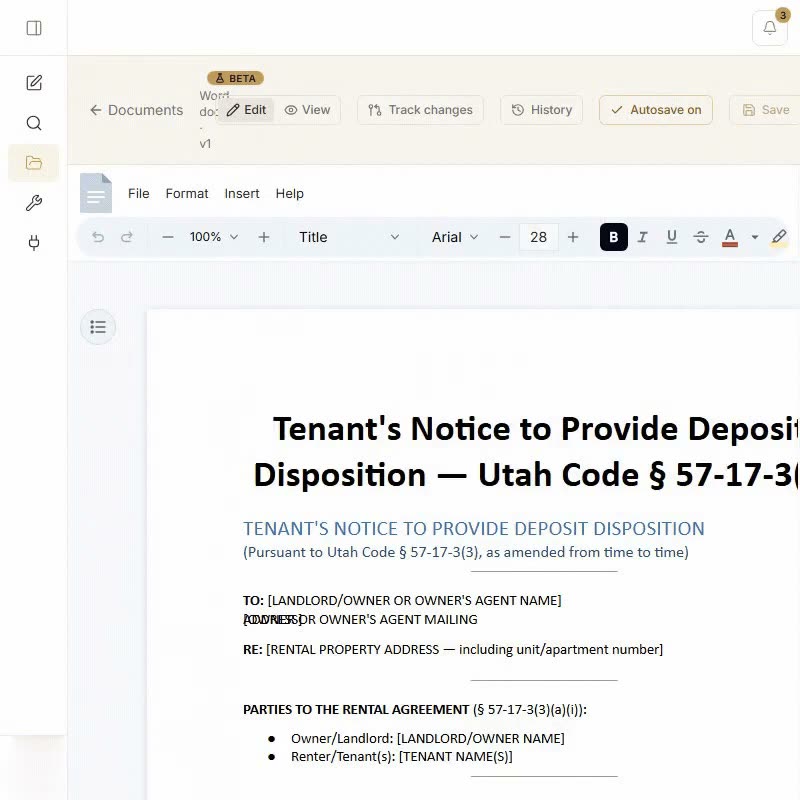
Edit Word docs in your browser with tracked changes and AI revisions, and every save creates a new version. Compare any two versions side-by-side with visual diff highlighting. Never wonder what changed or lose a prior draft.
- In-browser document editor with tracked changes and AI revisions
- Automatic version tracking on every save
- Side-by-side visual diff comparison
- Restore any previous version instantly
Access controls
Four levels of document visibility.
Firm-wide
Templates, guides, and policies visible to every attorney.
Lawyer-private
Only you can see it, enforced at the database level.
Client portal
Secure upload links. No login required for clients.
Share-link tracking
See every view and download on the links you share, timestamped.
Supported formats
Security
Private by design
Client files stay inside your firm. CaseRead gives every firm its own database schema, encrypts data in transit and at rest, and trains no AI model on what you upload.
SOC 2 aligned
Every control on our Security page is live in CaseRead today: a database schema for each firm, two-factor sign-in, a firm activity log, instant project purge, AES-256 encryption at rest and no training on your data.
Rule 1.6 and ABA Formal Opinion 512
Built for the duty of confidentiality: each firm gets its own database schema with row-level security, and nothing you upload trains any AI model.
Encrypted and US-hosted
AES-256 at rest, TLS in transit, hosted in the United States. Two-factor sign-in, which a firm admin can require.
See our Security page for details.
Common questions about the vault
Ready to secure your firm’s documents?
Lite is $15 a month for 20 research questions a month, up to 4 a day, with a Hallucination Shield check on any answer.
Lite $15/mo · Pro $149/mo · Cancel anytime