Legal drafting
First drafts built on your research and your files.
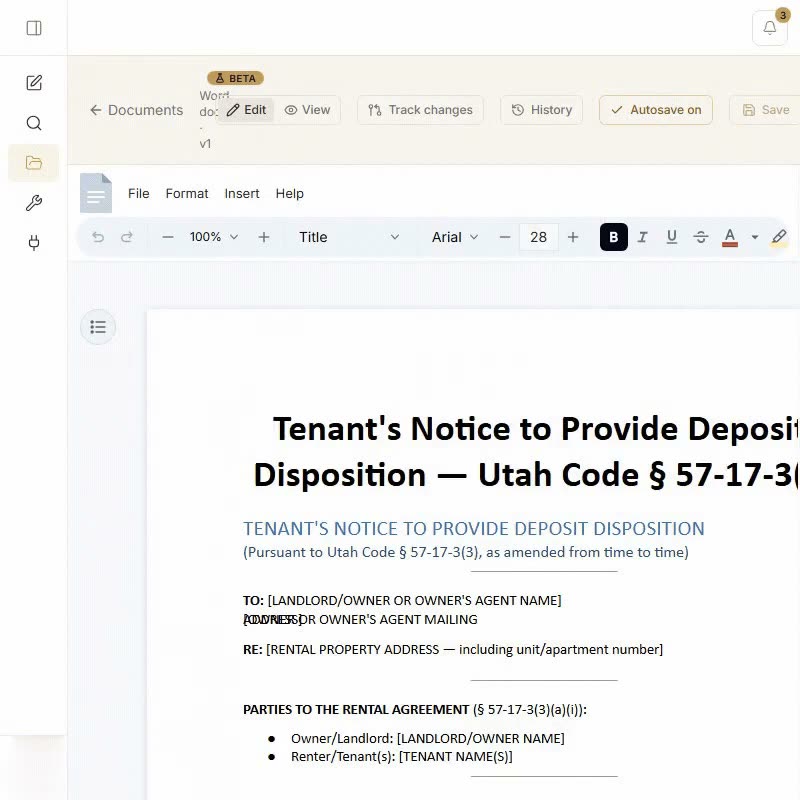
Ask for a letter, a motion or an agreement. CaseRead drafts it from the law found in the conversation and the documents in your project, and you finish it in Word, where every AI edit is a tracked change you keep or reject.
Free plan, no card · Pro $149/mo · Cancel anytime
How it drafts
From the question to a document you can send
Grounded in what you found
A draft can cite only the authority your research turned up in that conversation. It also reads the project: its details, its documents and the passages most relevant to the request.
- Statutes and cases from your research, cited in the draft
- Facts from the project’s own files
- Edit it, save it to My files, or export it to Word or Google Docs
Finish it in Word, with tracked changes
Open the draft in CaseRead’s in-browser Word editor. Ask the assistant to rewrite a section, make it more formal, simplify it, strengthen the terms or add a clause, and each edit lands as a tracked change.
Prefer Word itself? The add-in drafts beside your document: insert the text, then keep or undo it. Its edits follow your Track Changes setting.
In your firm’s words and format
In Settings → Train drafting, mark one reference template as the gold standard for each kind of document. Drafts of that type keep its defined terms, structure and phrasing.
- Turn on a template’s look and a Word file’s styles, page size and margins carry into every export of that type
- Split a template into clauses, or save your own, and drafts draw on them
- Insert a saved clause or your firm’s boilerplate from the editor
 Demand letter (firm form).docxGold standard
- Use this document’s look for demand letter draftsOn
- Clauses (3): Payment demand · Cure period · Reservation of rightsSaved
Train it by document type
Eleven document types you can train
Each can carry your own template, clauses and look. Anything else can be drafted from your instructions.
Around the draft
The rest of the job
Check it before it goes out
Run the finished draft through the Hallucination Shield: each citation is checked for whether the source exists and whether it supports the sentence.
How the Shield worksDates you confirm, on your calendar
CaseRead lists the dates written in your documents. Each one waits for you to confirm it, and confirmed dates can go to Google Calendar.
Kept with the project
Save the draft to the project’s files, where it sits with the rest of the record and is searched with it.
The document vaultSecurity
Private by design
Client files stay inside your firm. CaseRead gives every firm its own database schema, encrypts data in transit and at rest, and trains no AI model on what you upload.
SOC 2 aligned
Every control on our Security page is live in CaseRead today: a database schema for each firm, two-factor sign-in, a firm activity log, instant project purge, AES-256 encryption at rest and no training on your data.
Rule 1.6 and ABA Formal Opinion 512
Built for the duty of confidentiality: each firm gets its own database schema with row-level security, and nothing you upload trains any AI model.
Encrypted and US-hosted
AES-256 at rest, TLS in transit, hosted in the United States. Two-factor sign-in, which a firm admin can require.
See our Security page for details.
Common questions about drafting
Research it, then draft it, in one place.
Free plan: 20 research questions a month (up to 4 a day) and 2 citation checks a day. No card.
Free plan, no card · Pro $149/mo · Cancel anytime